Set Or Reset A Windows Administrator Password
Di: Jacob
Enter the new password, confirm it, and then select the desired options related to password expiration and change requirements.If you’re the administrator, there are a few ways you can retrieve or change the password: Use a Windows password recovery tool. If prompted by UAC, click/tap on Yes. Click the drop-down icon and select the password reset USB/disk device. Don’t forget to press Enter to execute the command after you’ve typed it.Change a User Account to Administrator Using the PowerShell. Press Enter to confirm your choice. Next, select the lock icon and enter your admin password. Replace with the username of the admin account and with your desired password.Explore the top methods to understand How to Reset Windows 10 Forgotten Admin Password without resetting your laptop or losing any data.Schlagwörter:Windows 10 Reset Admin PasswordAdmin and Password Reset
Lost Your Windows Administrator Password? How to Reset It
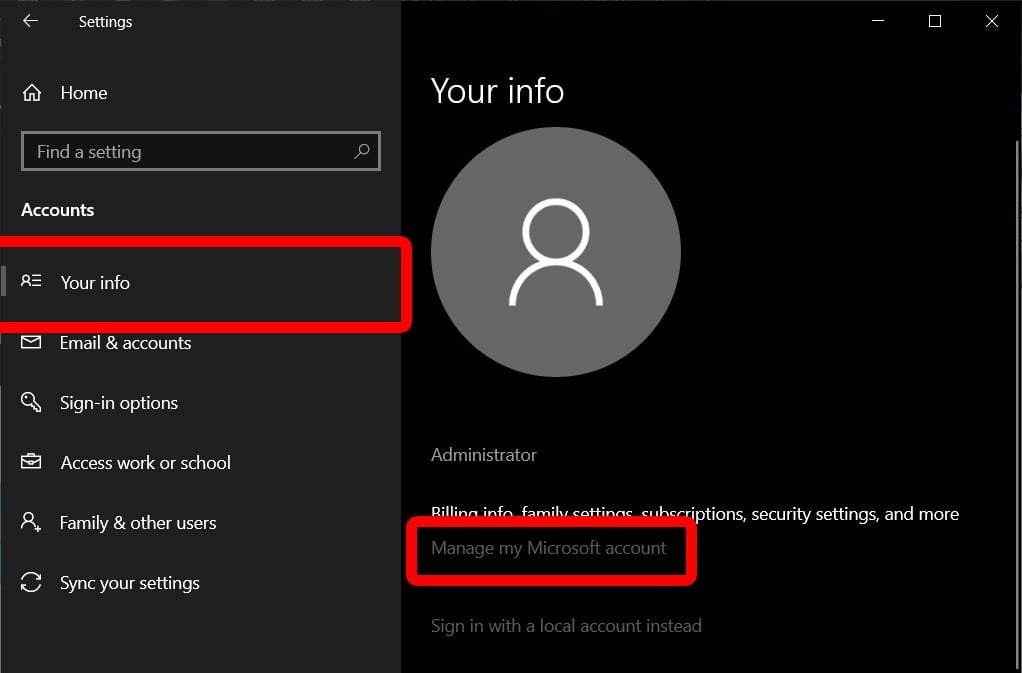
Click/tap on Users in the left pane, select a local account (e.exe c:\windows\system32\sethc., to p@ssw0rd), run this command:: net user administrator p@ssw0rd. For security reasons, Windows protects certain information by making it impossible to access if the users’s password is reset. Bypass Admin Password Windows 10 with Windows . 2020Reset Windows for new user7. Click Forgot my username option. Right-click the .If it’s a local account, press the Windows + X keyboard shortcut. If you had set Windows to automatically sign in to a local account at startup that you just changed, reset or remove . However, there are .In the upper-left corner of the screen, select the Apple icon > System Preferences > Users & Groups. Insert the password reset disk into your computer.Schlagwörter:Admin Password ResetThe Control Panel It’s a task that might seem daunting . Enter netplwiz in the Run window search box field. In such scenarios, you . When the WinX menu opens, select Command Prompt (Admin).If you have a usable local administrator account (which you imply you have) you can just open Computer Management -> Local Users and Computers, right . Expand Local Users and Groups and select the Users folder. IMPORTANT: If you want to change the type of a Microsoft account in any command-line environment, replace NAME with the first five letters of the email address associated with it. Click the Accessibility icon to launch the command prompt.How to Reset Settings App in Windows 10 | Tutorials4. To reset the user account (e. In the dialog box, type compmgmt.In the Command Prompt window, type the following command to reset the password for the local admin account: net user. On the next screen, enter your old password while leaving the fields for New Password and Confirm Password empty.exebak c:\windows\system32\utilman. Then type a new password and type a password hint to reset your password in Windows 11.Schlagwörter:Windows Administrator PasswordWindows 10 Reset Admin PasswordPower to the Developer! Since you just set it up, I recommend you boot into recovery, reset it, then setup with a proper user name and password. Click Next, select the password key location from the drop-down menu, and then click Next . Meantime, choose the Windows system. If you want to remove the password, you need to leave all the text fields as empty and then click Change password instead. Continue to hold down the shift key while clicking Restart.Our focus is providing customers with technical guidance and support to safely bring disrupted systems back online.Tätigkeit: Editor-In-Chief
How to Reset the Admin Password in Windows 10
There are only two Microsoft-approved ways to reset a Windows password, which are discussed at the bottom of this page.To disable the Password Option in Windows 11, follow these steps: Press the Windows key + R at the same time.This step-by-step guide will show you how to reset an administrator password in Windows 10 , whether you have a Microsoft account, or a local account. After setting the password, enter Exit to exit the CMD and return to the home screen. Log on with your Email ID and domain account password to find the BitLocker recovery key associated with your device. – On the right pane of the Window (in the list of local users) – Right-click the account name for the .msc, and then press Enter. Whether you’re a business owner safeguarding sensitive data or a personal user keen on protecting your privacy, knowing how to change or reset your administrator password is essential.
Set or reset a Windows administrator password
We strongly recommend that you change this initial password, as detailed in our guide about securing a dedicated server . If you have a single-boot (Ubuntu is the only operating system on your computer), to get the boot menu to show, you have to hold down the Shift key during bootup. Here are the steps to follow −. This is easiest if you’ve set up the proper recovery methods, . Click Reset password and click Next.If you forgot your Windows administrator password, you might be locked out of your computer and unable to access your files and settings.
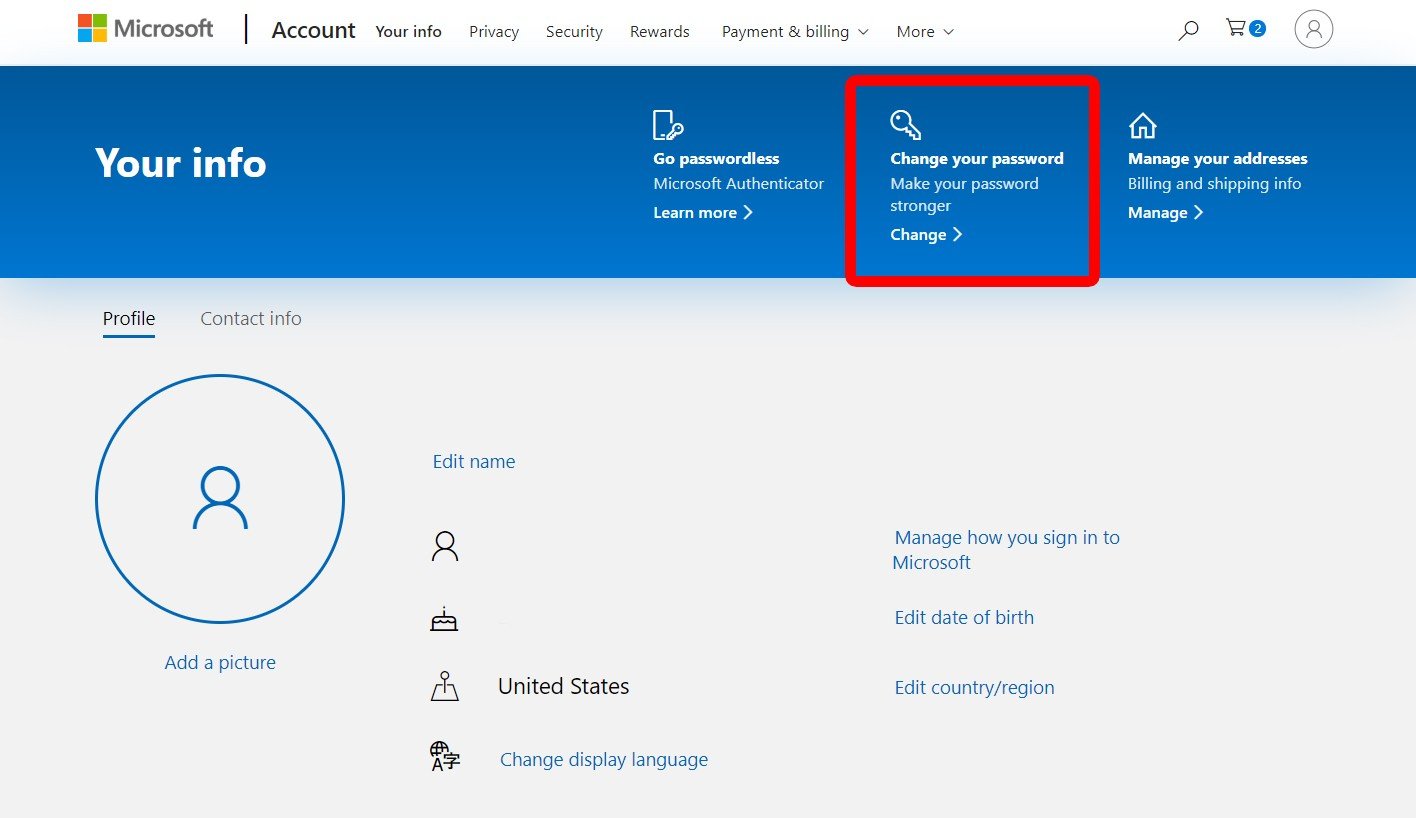
In this video, we will learn three different ways to reset an admin password. Set your new account name, select OK, then restart your Mac.exe with the original file (to avoid leaving a security hole in the server): copy c:\windows\system32\utilman.Once you get to the logon screen, click the Accessibility Options icon. Brink_2) in the middle pane, and click/tap on More Actions and Set Password in the right pane.Schlagwörter:Windows Administrator PasswordAdmin Password Resetexe: copy /y c:\windows\system32\cmd., Ramesh) password, run this command:: .5 million Microsoft Windows operating systems worldwide causing global .Schlagwörter:Microsoft WindowsChange Administrator Password Now you have a command prompt running under the NT AUTHORITY\SYSTEM account, which allows you to perform various actions.If you have forgotten the password of your Windows 10 local account and that happens to be your administrator account as well, resetting the password becomes a tough task.Open the Microsoft Sign in page for your administrator account.If it is a local account, you can draw supports from the pre-created password reset disk, other account with administrator privilege, etc. Click on User Accounts.Erroneous cybersecurity software update (not a cyberattack) Outcome. The Password Reset Wizard opens. Right-click the appropriate user in the list and click Set Password.0 or some version of Windows 2000, you can reset the administrator user account password by using a simple trick and hack that involves default screen saver, beside using third-party password recovery system or apps such as Login Recovery. Follow the on-screen instructions to create a new password for your local user administrator account. Fortunately, there is an unapproved but perfectly safe, and very effective, way to reset passwords for .Schlagwörter:Windows Administrator PasswordMicrosoft Windows
How to Reset Admin Password in Windows 11/10
Choose the password reset disk from the list of options.Changing an Administrator account to Standard from CMD. On the Windows 11 login screen, click on the Reset password link. Hold down the shift key on your keyboard while clicking the Power button on the screen. When you install or reinstall a Windows operating system, you are provided with a password for administrative access. Reset Admin Password on Windows 10/11 with Password Reset Disk.
How to reset administrator password on Windows Server 2019
If you have a dual-boot (Ubuntu is installed next to Windows, another Linux operating system, or Mac OS X; and you choose at boot time . Follow the steps a.
This will change to the CrowdStrike directory. Geben Sie einfach ein falsches Passwort ein und die Meldung „Passwort zurücksetzen“ wird angezeigt. After clicking the Start button, type windows powershell into the Windows Search, and select Run as Administrator. Step 5: Choose the “reset account password” option and reset the password.
Fehlen:
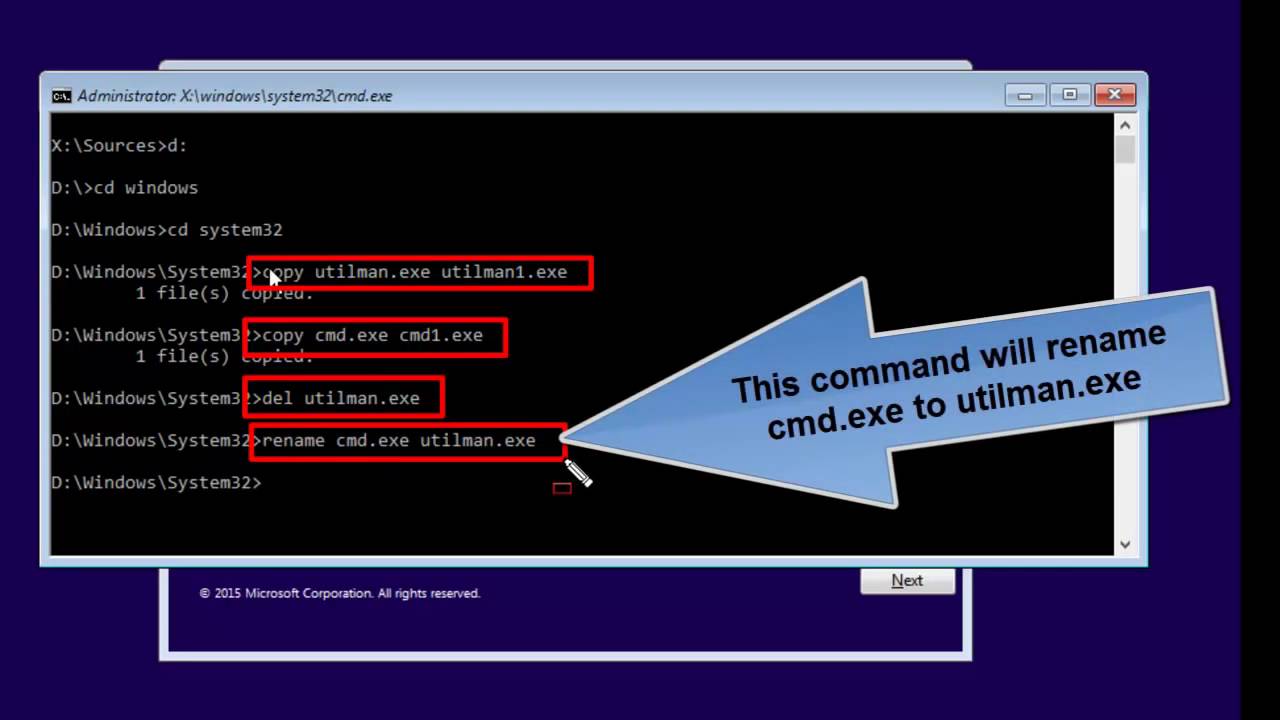
passwordmsc in the search box in the Start menu or on the taskbar, and press Enter.Boot your server from the installation media again and replace utilman. However, there are a number of reasons why one or the other method very often isn’t an option.Schlagwörter:Windows Administrator PasswordLocal Administrator Password You can now go back to .Managing administrator passwords on Windows 11 is a fundamental aspect of ensuring your computer’s security. Now It will open a command prompt! says: Resetting this password might cause irreversible loss of information for this user account.

– Double-click the “Local Users and Groups” folder.If you’re using Windows NT 4.Method 3: Using Local Users and Groups Snap-in.Learn how to reset the password of the admin account of a Windows Server OS via the OVHcloud rescue mode.Schlagwörter:Windows Administrator PasswordMicrosoft Windows Then, enter the new password you just created. At the Command Prompt, type . Set a new password and confirm it (the new password must match your local Group Policy password settings ); Now you need to check if your .
Non destructive change of Windows 10 administrator account password
It will let you change or reset any of the local passwords on the system.
How to bypass Administrator password in Windows 11/10
After you see the login screen, press Shift five times or press on Accessibility.Head to Microsoft’s account recovery page and walk through the steps to get back into your account. In User section, right . If you’ve created a password reset disk, connect the device and follow .Connect the Windows 11 password reset USB or disk to your PC.Schritt1: Erster Zugang zu Ihrem Windows 10-Anmeldebildschirm.We’ll show you how to reset administrator passwords in Windows, even if you don’t have admin rights. When you type the wrong password, Windows will provide a “Reset .Schlagwörter:Microsoft WindowsWindows 10 Reset Admin PasswordDepending on whether you chose to create WinPE or safe mode media, the user will either be prompted to boot to Windows PE and the remediation script will .Administratoren .msc in Run or Search bar from Start menu to open Local Users and Groups snap-in tool.† Computer Management > Users > user > Set Password. Enter a new password, enter it again (you won’t see it) and log in.
How to Reset a Local Administrator Password on Windows
To change the local administrator password on Windows 11, you can follow these steps: 1. Besides, even we forget the login password, we can also . Reset Admin Password on Windows 10/11 with Microsoft Account.scr password reset crack method, users can reset the . Open the Control Panel.To reset the user’s password (in this example, the username is root), run the command: net user root *. Let’s reset our admin account password by using .After you get to the logon screen, click the Accessibility icon to get the command prompt started. Press Enter to set the new password. From Netplwiz Wizard.
How to Bypass Admin Password Windows 10
Once the Command Prompt opens, run these commands, replacing user_to_change with the user you want to reset the password of: net user user_to_change *.Need to reset your administrator password in Windows? Learn several ways to do it, whether you’re using a Microsoft or local account.Insert the password reset disk or USB flash drive into the computer, and then click Reset password. The same way you would reset the passwords for a physical Windows machine.exe /y; Restart your domain controller in the normal mode and make sure that you can now log on to your DC . Change View by to Small icons (upper right part of control panel) 3. Recover your username using your Email or phone number.Another way to change the account password: Type lusrmgr. Another way to reset an administrator account’s password on Windows Server is by using the Local Users and Groups snap-in tool. How to set an account .
At the next screen, enter or confirm an alternative email address through .Da Sie zum Aktivieren die Eingabeaufforderung benötigen und nicht auf Ihr Konto zugreifen können, müssen Sie Ihren Computer im Wiederherstellungsmodus . Follow the on-screen instructions to create a new password and password hint.
How to Reset Windows 11 Password
Reset the user’s password. Data loss will occur next time the user logs off.Step 3: Restart the computer and press ”F12” or ‘ESC” to enter the boot menu. Click OK to save the changes.If your PC is on a domain, your system administrator must reset your password. Unintentional crashing of ~8. The command prompt should look like this: Setting a new administrator password using CMD. Step 4: Restore Utility Manager.
Windows 10 Administrator-Passwort vergessen?
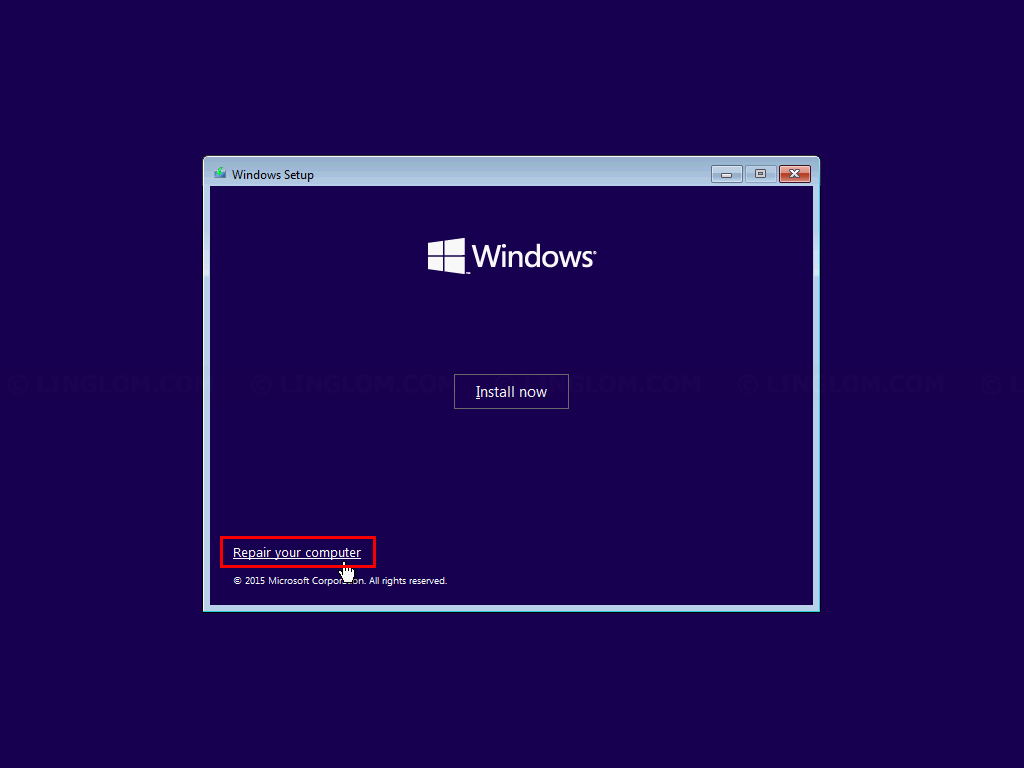
2017Weitere Ergebnisse anzeigenSchlagwörter:Windows Administrator PasswordLocal Administrator Password Click on the Sign-in options. Steps taken have included: Engaging with . Reboot your computer and start the Windows installation where you forgot the administrator password.Type a password hint if you need and select Change password. The Netplwiz tool on Windows also allows you to reset the password for any account that you are not currently logged into.
2017Locked out of admin account in windows 107. While we focus on . Press the Windows key + X on your keyboard and select .Schlagwörter:Windows Administrator PasswordMicrosoft Windows
How to Reset the Windows Administrator Password
Click the Forgot password link from the screen where you enter the password. 2017Delete User Account in Windows 10 | Tutorials27.Where newpassword is the new password that you will assign to the Windows Server administrator.Schlagwörter:Windows Administrator PasswordAdmin and Password Reset
Verwalten von Benutzerkonten in Windows
But Windows offers a few ways to recover or reset your administrator password. Click on Manage another account.To reset the built-in Administrator account password (e. The User Accounts window will open .Wichtig: Sie sollten die Anzahl der Administratoren auf Ihrem Windows-Gerät begrenzen, da Administratoren die vollständige Kontrolle über das System haben.

Once you have received your username, you can change your password by clicking on Forgot password. Schritt2: Legen Sie dann das Laufwerk zum Zurücksetzen des Passworts in Ihren Computer ein und klicken Sie auf den Link „Passwort zurücksetzen“.Forgot your Windows 10 admin password? Here are three ways you can reset your Windows 10 admin password and take back control of your system. Step 4: In the boot menu, choose your USB/CD/DVD drive and press “enter” to put it.At the same time, press the Ctrl + Alt + Del keys from your keyboard and tap on Change a Password.Yes, you can change the old password via GRUB. Start your computer to access the login screen. Press and hold the Control key > choose the account you want to rename > Advanced Options. Click Users in the left-hand pane.Follow these steps: 1.– Press Enter. My preference is Offline NT Password and Registry Editor.
How to Reset Active Directory Domain Admin Password
- Wie Und Wann Pflanze Ich Kartoffeln Richtig?
- Station 3 Name: Absolute Und Relative Häufigkeiten
- Gehalt: Director Of Controlling In Deutschland, 2024
- So Aktualisieren Und Ändern Sie E-Mail-Passwörter Auf Ihrem Iphone
- Zitate Und Sprüche Von Petyr Kleinfinger Baelish
- What Ram Is Compatible With My Motherboard?
- Die Besten Schlafanalyse-Apps Für Ios Und Android
- Landesinstitut Für Lehrerbildung Und Schulentwicklung Hamburg
- Persönliche Assistentin Jobs In Essen
- T-Shirts: Lacoste V Ausschnitt
- Die 10 Besten Bäckereien In Baden-Baden
- The Philippine Flag As A Trademark